Calendr Family calendar
Everyone knows what tomorrow looks like
Practice is in one parent's phone, the parent-teacher conference in the other's. Both land on Thursday, and nobody works that out until Thursday. Calendr puts the whole family's week in one calendar. Everyone sees it at the same time.
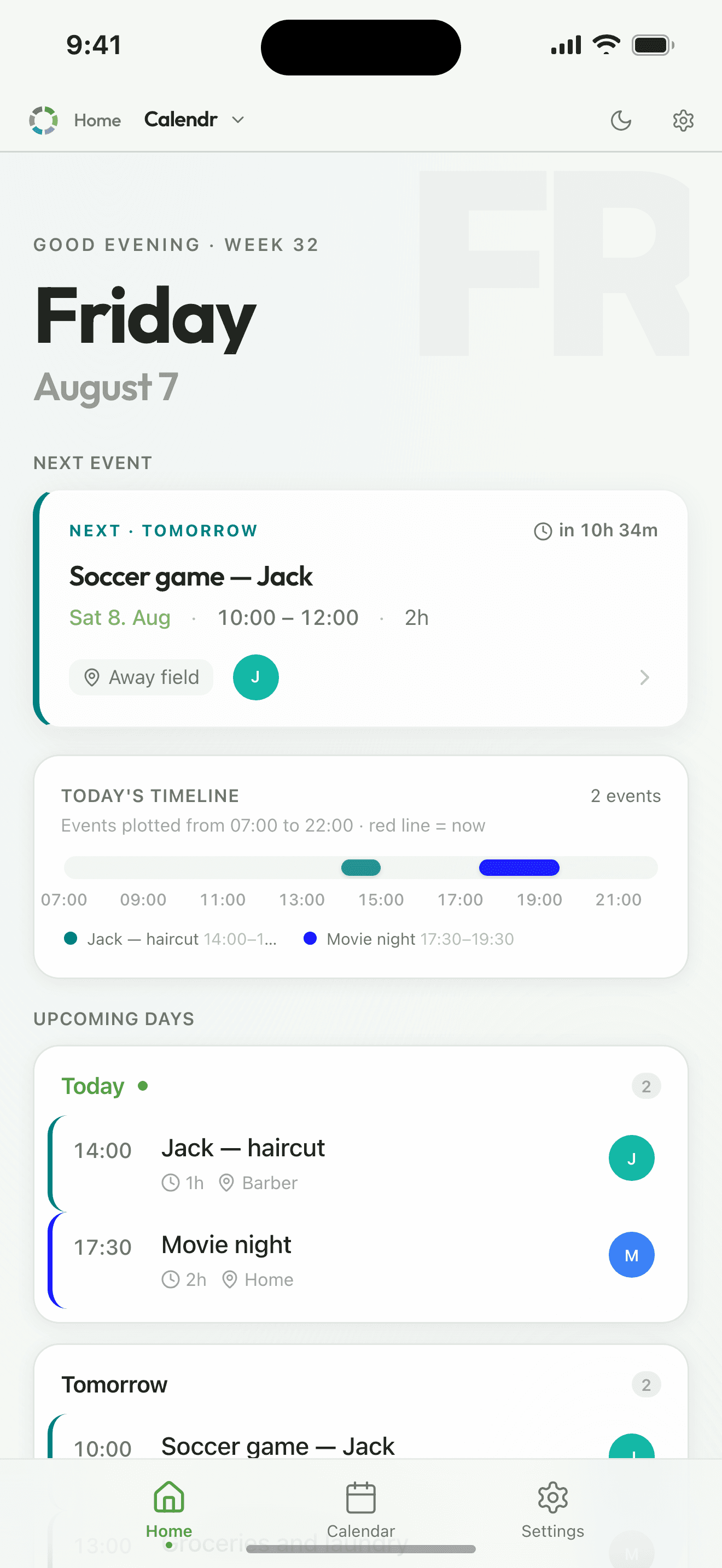
What Calendr really is
A shared week. Everything you have arranged sits in one place, one color per person, and everyone sees the same thing. Without a shared place each of you holds only your own piece, and the pieces rarely agree.
Calendr is not a task tool. Who does what belongs in Taskr, the chores module in the same package.
See it in action
How it works
Put it in once
Choose who it applies to, and everyone has it. Give each family member their own color if you like.
See the whole week at once
Everyone's plans in the same week. If Friday is full, you can see that without counting.
Get told before it happens
A reminder on your own phone, once you switch notifications on. You choose how far ahead, and one event can carry several.
What you get
- No more 'what's happening Thursday?'
- The week is right there. Whoever is wondering can look for themselves.
- One round of messages fewer, every week
- An appointment written down nowhere has to be agreed all over again: two adults, two phones, in the middle of a working day. That is the round that disappears.
- See double bookings before they happen
- Put one appointment on top of another and Calendr says so before you save.
- Move plans with a drag
- Drag the event to a new day or a new time. That works in week, day and agenda view. If it repeats, Calendr asks whether to move the one or the whole series.
- Speak the event in
- Say 'doctor tomorrow at nine'. Calendr fills in the title, the time and who it is for.
- Bring the calendar you already have
- Import an ICS file from Google or Outlook, or add a calendar address and press sync to pull it in. No reason to type it all in again.
Scenario
An aunt calls and wants to come over
One glance, instead of a text thread that runs until tomorrow.
- You open Calendr while she is still on the phone.
- Tuesday and Wednesday are full. Thursday is empty.
- You put the visit on Thursday, with all four of you on it.
- Everyone has it in their own calendar straight away.
- No follow-up message. She got her answer while she still had you on the line.
Pricing
The package Calendr is in
Organr
- Week
- $1.90$98.80 a year
- Month
- $5.90$70.80 a year
- Year
- about$4.92/mo$59.00 charged once a year, and that works out cheapest over a year.
- 7 days free, nothing is charged automatically
- Room for six members on one subscription
- Paid for and cancelled in the App Store
Questions about Calendr
Can we create repeating events?
Yes. An event can repeat on the weekdays you choose, as many times as you decide. Move or cancel a single day and the rest of the series stays put.
Do we get reminders before things happen?
Yes. Each event can carry several reminders, and you choose how far ahead each one comes. They go to the people the event is for, on their own phones, once notifications are switched on.
Which package includes Calendr?
Calendr is part of Organr. The modules are not sold separately. The price is the same whether you use one of them or all of them. The package costs $1.90 a week or $5.90 a month for the whole household. You try everything free for 7 days first, and cancel in the App Store whenever you want.
Does everyone in the family need their own account?
No. One adult sets up the household with their email address. Everyone else is added as a member. They sign in by tapping their name and entering a code, so children need neither email nor password. The household has room for 6 members. The price is the same whether there are two of you or 6.
Do the others see changes straight away?
Yes. Calendr syncs while you use it. Whatever one person adds shows up for everyone else, without anyone having to refresh.
How do we install Organr?
You download it from the App Store. It is one app with every module inside it, so there is nothing else to install.
Read more
- The Complete Guide to Organizing Your Family's Schedule in 2026What you know about your family sits in five places that never talk to each other. Five steps to pull it together: calendar, chores, list, dinners, Sunday.9 min read
- 10 Chore Charts That Actually Work (And an App That Makes It Easier)A chore chart has to be kept up by a person, every week, for ever. Here are ten formats, and what decides whether one survives on the kitchen wall.8 min read
- 5 Tips to Organize Your Family's Daily LifeActivities and housework usually end up inside one person's head. Five moves that get them out of there and into something the whole family can see.4 min read