Pantr Know what is in the pantry
Know what is in the cupboard
You are standing in the store wondering whether you have canned tomatoes. You take two to be safe, and find four when you get home. Pantr is the list of what is actually at home. Everyone who lives there keeps it current.
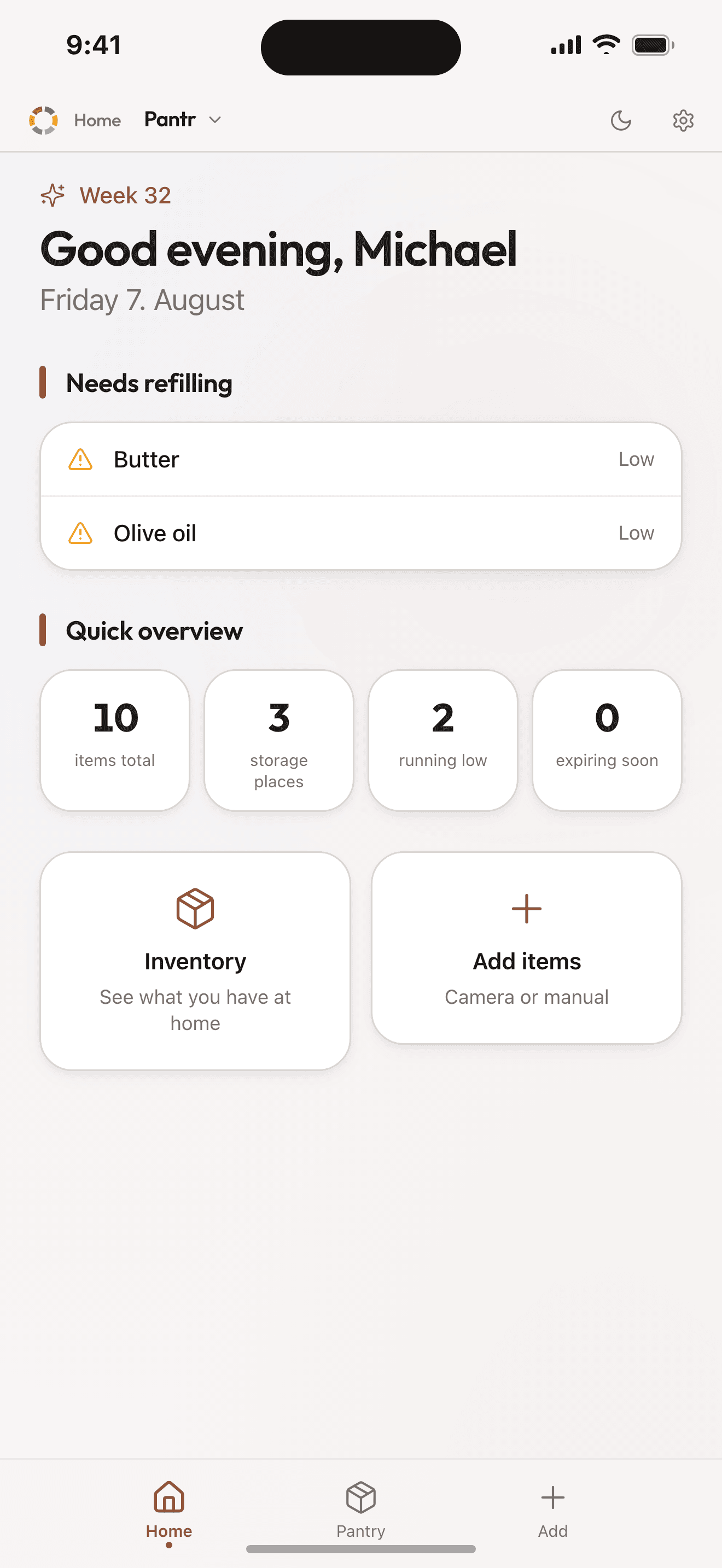
What Pantr really is
An overview of what you have, with three states per item: in stock, low, empty. That is enough to know whether something needs buying. Without it you shop from memory, and memory always buys mustard.
Pantr is not inventory management with counts and quantities. One item has one status, and you change it with a single tap.
See it in action
How it works
Scan it or type it
Photograph the items and they sort themselves into categories. Or type them in, and Pantr suggests the category from the name.
Set up your own storage
Fridge and freezer, or the shelf in the basement if you have one. Filter by place when you are hunting for something.
Connected to the other modules
Whatever has run out you send over to Listr, the shared shopping list, with a tap. Fridgr is the dinner module. It reads the pantry and suggests dinners from what is in it. Both sit in the same app. There is nothing new to install.
What you get
- The end of buying it twice
- Type in something you already have and Pantr says so before you add it again. Send one to the shopping list and it tells you if it is already there.
- What nobody knows about gets thrown out
- A packet at the back of the fridge does not get eaten, because nobody remembers it is there. Put a date on an item and Pantr counts the days down while it is still food.
- Straight from empty to the list
- Mark an item empty and send it to Listr with one tap. Several at once works just as well.
- Dinner suggestions from what is in there
- Fridgr reads the pantry and suggests dinners you can make without shopping first.
Pantr works best together with
Pantr is the starting point of the food flow: Fridgr reads the pantry and suggests dinner, and whatever has run out goes on to Listr.
Scenario
From an empty cupboard to a full cart
Without buying anything you already have standing there.
- You open Pantr and see that the milk is 'Low' and the butter is 'Empty'.
- One tap on the cart icon, and both are on the Listr list.
- Fridgr sees chicken and rice, and suggests three dinners.
- You shop, check off in Listr, and send the checked items back into Pantr.
- Next time you wonder whether you have tomatoes, you look instead of guessing.
Pricing
The package Pantr is in
Organr Plus
- Week
- $3.90$202.80 a year
- Month
- $13.90$166.80 a year
- Year
- about$11.58/mo$139.00 charged once a year, and that works out cheapest over a year.
- 7 days free, nothing is charged automatically
- Room for six members on one subscription
- Paid for and cancelled in the App Store
Questions about Pantr
Do we have to count everything we own?
No. Each item has just three states: have, low or out. You switch between them with one tap. The point is knowing whether something needs buying, not running a warehouse.
Does what we are missing end up on the shopping list?
Yes. Items marked low or out can be sent straight to Listr, one at a time or several at once. If the item is already on the list, the app tells you.
Which package includes Pantr?
Pantr is part of Organr Plus. The modules are not sold separately. The price is the same whether you use one of them or all of them. The package costs $3.90 a week or $13.90 a month for the whole household. You try everything free for 7 days first, and cancel in the App Store whenever you want.
Does everyone in the family need their own account?
No. One adult sets up the household with their email address. Everyone else is added as a member. They sign in by tapping their name and entering a code, so children need neither email nor password. The household has room for 6 members. The price is the same whether there are two of you or 6.
Do the others see changes straight away?
Yes. Pantr syncs while you use it. Whatever one person adds shows up for everyone else, without anyone having to refresh.
How do we install Organr?
You download it from the App Store. It is one app with every module inside it, so there is nothing else to install.
Read more
- The Complete Guide to Organizing Your Family's Schedule in 2026What you know about your family sits in five places that never talk to each other. Five steps to pull it together: calendar, chores, list, dinners, Sunday.9 min read
- How to Stop Forgetting the Grocery List: Tips + Free TemplateForgetting the list is a solved problem. Five habits that fix the system for good, plus a printable template if you still prefer pen and paper.6 min read
- Family Meal Planning for Beginners: A Week-by-Week GuideIt does not have to mean batch-cooking Sundays and colour-coded spreadsheets. A week-by-week guide that starts with three dinners and ends the 5:30 panic.7 min read